Schwarttzy.comAdventure Seeker

  • H3 Hummer
  • Website Design
    • Adventure Bound Basic
    • Adventure Theme
    • Adventure Theme
    • Mammoth Theme
  • Shop
    • Cart
    • Checkout
    • Your Orders
  • Links
  • 4X4 Trails & Parks
    • Rubicon Trail
    • Texas
    • Utah
    • Term of Use
  • Contact Me
  • About Me
    • Books
    • DVDs to Xbox 360
  • Jul
    25th
    Semper Fi

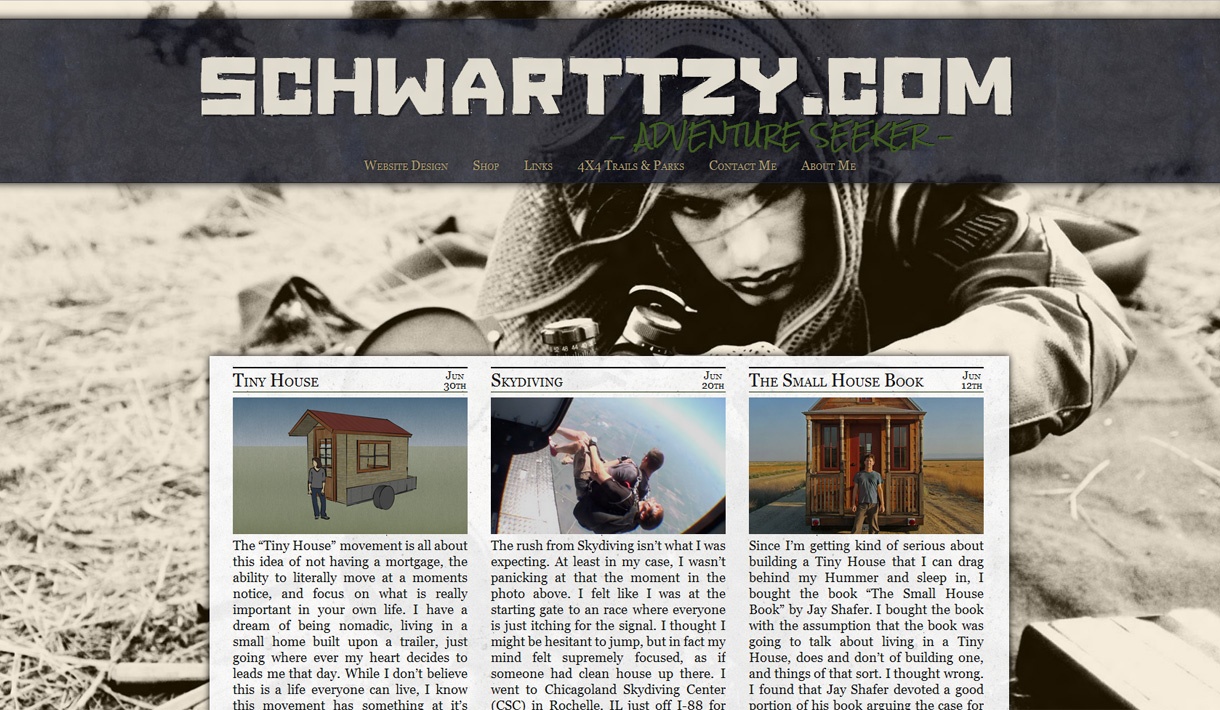
    Dedicate to my Grandfather’s Bravery in WWII , the WordPress Theme Semper Fi has a high quality newspaper feeling to it. From hidden luxurious floral patterns, to images that create the nostalgia of finely crafted paper, incredibly detailed shadowing, but most importantly, Semper Fi has the ability to respond to any width screen. From 300 pixels wide, all the way to 1920 and beyond, mages, galleries, quotes, text, and titles all move fluidly to respond to any thing you through at it.

    $15.00

    Thanks for your interest in Semper Fi!

    Thank you for your interest in the WordPress Theme “Semper Fi Lite.” I hope that you enjoy it and that I can continue to create these beautiful themes for years to come. But, if you could take a moment of your time and have you become acutely aware that I’m creating this Theme and other themes free of charge, and while I’m not looking to get Rich, I really like creating these themes for you guys. Which is why I offer additional customization of “Semper Fi Lite” when you support me and install the standard version, “Semper Fi.”

    If you would like to support me and my theme just click the add to cart button above and complete the checkout process.

    Thanks again,
    Eric Schwarz

    Customizing Semper Fi

    More features exist in this theme than this old video shows.

    How to Install

    The WordPress Theme Semper Fi Lite files and folders in zip format can be downloaded by clicking on this link. The standard version of the Theme Semper Fi can only be downloaded after you have completed the checkout process. If you have any trouble obtaining the standard version after purchasing it, contact me using this form.

    1. Download Semper Fi in a zip format and leave it as is.
    2. In your admin panel go to Appearance > Themes > Install Themes
    3. Select ‘ Upload’ from the top menu (It is right next to the ‘search’, ‘featured’, ‘newest’…)
    4. Browse your computer for SemperFi.zip or SemperFiLite.zip
    5. Click and Upload.
    6. Be sure to Click “Activate” if prompted.

    Now, under your Appearance Tab, in the Themes directory you should now have your new theme under the name “Semper Fi” or “Semper Fi Lite.”

    Features

    Semper Fi Theme Features Lite Standard
    100% Responsive WordPress Theme ★ ★
    Clean and Beautiful Stylized HTML, CSS, JavaScript ★ ★
    Featured Images for Posts & Pages ★ ★
    Change the site Title and Slogan Colors ★ ★
    Google Analytics & Site Verification ★ ★
    Upload Your Own Background Image ★ ★
    Choose from 4 different Background Paper Images ★ ★
    Upload your own Background for the Paper Image ★
    Multiple Menu Banner Images to Choose ★ ★
    Google Web Fonts for Title, Slogan, Post Title, and Content ★ ★
    Upload Your Own Custom Banner Image ★ ★
    Comments on Pages only, Posts only, Both, or None ★ ★
    Option to have dates on posts to not display. ★ ★
    Option for Social Icons in the menu. ★ ★
    Option for search bar in menu. ★ ★
    Upload Your Header Image ★
    Upload Your Own Logo ★
    Change the Link Colors in the Menu ★
    Choose you own Hyper Link Color ★
    Favicon to be Easily Implemented on Your Website ★
    The Ability to use Custom Fonts from Typekit ★
    Remove my Mark from the Footer with the click of one button, instead of digging through the code to remove it. ★
    Personal Support on Technical Issues You May Run Into ★

    Semper Fi Lite Version Information

    Version
    1.9 Forgot a bit of code in the CSS that would just waste bandwidth.
    1.7 Added code to the theme so that search engines can understand when a post was published. Brought back featured images into individual posts and pages, but you have to enable from the theme customizer. Dropped some code I thought I would use but never got around to it. Finally I fixed the google analytics, not sure what happened, but it is back along with adding site verification.
    1.6 Fixed the issue where comments wouldn’t display.
    1.5 Fixed an issue with comments, SEO plugins, and add complete control over commenting.
    1.4 Minor fixes that show up in the header the theme options are blank.
    1.3 Included Google Web Fonts for the Title, Slogan, Menu, Post Title, and Content. I also cleaned up the “Theme Customizer” menu so that it makes more sense.
    .9 Just a mix up in the code that would cause some errors in version .8
    .8 Decided to rewrite the theme over again, completely from scratch, after having an amazing thought. The responsive website movement is because the vast number of different size resolutions of screen that we view the content. This amazing thought came to me that I could base everything off of em, which is the average width of one letter on your screen. Unlike using pixels to decide how the website displays where you have no idea what the end users font size is, using em give you a relatively good idea. Doing it this way I have optimized the readability of website based on how the user want to view the website. I also cleaned some code up to lighten the load on browsers and bring a more unified experience whether you’re using Chrome, Firefox, or Internet Explorer.
    .7 Small update to add in a new feature and rewrite some of the code. The new feature allows for someone to choose from 4 different choices for the white background that looks like paper. This feature is located under the “Background” tab on the “Theme Customizer Page.” As for the rewrite of the code, I decided to have the Style.CSS file leave partially unfinished and have the default choice, or the choices currently chosen, finish the file Style.CSS with the missing code in the Header of the page. By choosing to leave the code out, browsers such as in firefox, chrome, IE, etc. will only see the CSS code once and won’t have to write over and duplicate entries. Basically it keeps things lighter and cleaner.
    .6 Quick update to add some more features to the theme along with a better “Theme Information” page. It is now possible to choose one of three different banners on the Theme Customizer page. I plan to add even more choices in the future for the banner, and on a side note you can upload you own with Semper Fi. Added in the ablity to easily change the color on Site Title and also the Site Slogan on the Theme Customizer page too. I have removed the file “theme-options.php” from the theme and the that was in there has been move to the file “functions.php” which is in the same folder. Finally the javascript file “background-size-preview.js” which handled the background changing on the Theme Customizer has been rename to “customizer.js” becuase it makes more sense since adding a bunch of code.
    .5 Initial Release

    Semper Fi Version Information

    Version
    7 Same stuff as in 1.7 Semper Fi Lite, but special stuff for you guys soon.
    6 Same stuff as in 1.5 Semper Fi Lite.
    5 I have add the option to Upload a Header Image, a Banner Logo, Just the menu at the top or bottom, Google Web Fonts, orgainzed the “Theme Customizer Menu,” adjust the margin from the top of the page to content, and fixed a bunch errors & issues. I wasn’t able to have the sidebar make it into this update, but will be in the next update coming soon.
    4 Semper Fi, the standard version received a similar update to “Lite” in .9 including the same new features and small rewrite of some code. Theres no real difference between the two except for the additional features.
    3 Semper Fi, the standard version received a similar update to “Lite” in .7 including the same new features and small rewrite of some code. It too now includes 4 different choices for the white background that looks like paper, but unlike “Lite” the standard version of Semper Fi allows you upload your own image also. Semper Fi also had the same rewrite of code so that the code basically leaves Style.CSS uncomplete and has the final bit of code added in the header based on either the default choices, or the ones currently chosen in Theme Customizer. All in all the point is to reduce the footprint of code, and the possibility of downloading unnecessary content.
    2 This is the first update after the initial release of the “Lite” version of “Semper Fi” and includes a bunch of changes for the better. Both “Semper Fi” and “Semper Fi Lite” now use Theme Customizer instead of Theme Options to customize the page, allowing for the administrator to visually see the changes to the website before the changes take effect in real time. I have included all the promised functionality into the theme with this update, except for a custom logo which will be in future update. Which means you can change the color on the Links, Menu, Title, and Slogan for now, and more in the future. This update also includes the ablitiy to choose from the three standard options for the banner, but unquie to the Semper Fi you can upload your own image for the banner, where as you can’t in Lite. Finally, with this update I have added in the ablity for you quickly remove the footer that says “Good Old Fasioned Hand Written Code by Eric J. Schwarz” from the theme.
    1.1 The initial release.

    About Semper Fi

    Thank you for using my theme “Semper Fi” because without you I wouldn’t be able to make these beautiful themes for WordPress. I dedicate this theme to my Grandfather, Eldon Schwarz, for his strength and courage in WWII. He is the sole survivor of the crew aboard the B17 Flying Fortress #44-6349, of the 483rd Bombardment Group, in the 840th Bomb Squadron and a prisoner of war from August 7, 1943 – November 5, 1945. I miss you Grandpa.

    This theme began with me reading a newspaper from May 8, 1945. Just holding it I could sense that a lot time and planning went into simple things like font, layout, and especially choosing the paper’s material. I marveled at the quality that clearly went into this paper. Even with how old the newspaper was, it makes modern newspapers just seem like a mere shadow of themselves clinging to their former glory.

    Because of that I decided that I had to create a theme that feels like a newspaper, rich with details and fine quality. From hidden luxurious floral patterns, images that create the nostalgia of finely crafted paper, to incredibly detailed shadowing, but most importantly, the ability to respond to any width screen. “Semper Fi” is a completely flexible theme able to stretch from 300 pixels wide, all the way to 1920 and beyond. Images, galleries, quotes, text, titles, they all move fluidly to respond to any thing you through at it.

    Post Categories:
  • ‹ H3 Rock Sliders (You need 2 in Cart)H3 Hummer High Clearance Leaf Spring Mounts ›
  • Comments

    1. Rebecca Trelfa says:
      May 10, 2013 at 2:53 PM

      I installed the Lite version to play around with it. I expected my customer header image to go up above the menu, where the text currently is, but instead it ended up at the top of the box that sits below the menu. Can I get a header image to replace the text above the menu? I really want it up at the very top of the screen.

      Secondly, my widgets are not on the right where I want them — they’re down under the text on the home page. Not sure why–is this an issue with the actual page, you think? Thank you. Looks awesome BTW

      Reply
      • Schwarttzy says:
        May 14, 2013 at 10:42 AM

        Rebecca,

        Because of the way I made the theme, the header image is where it is, I do offer more options with the premium version that are just what you’re looking for. The widgets are where they, content is king and because of such I wrote the theme that way. I have been looking into putting a sidebar into the theme but I keep having problems because of the way I wrote the code.

        Reply
    2. Dave says:
      May 5, 2013 at 4:19 PM

      I love the look of this theme. Is there a way to get multiple ads on it?

      Reply
      • Schwarttzy says:
        May 7, 2013 at 12:36 PM

        Thanks for the complement! I really wouldn’t know about getting ads into the theme, simply because I’ve never tried.

        Reply
        • Dave says:
          May 7, 2013 at 7:15 PM

          No worries. Let me know if you ever try. If you do I’d purchase the standard theme. Also, I noticed it doesn’t show some of the full titles for posts on the front page. Is there a way to fix that. Thanks again.

          Reply
    3. Pin says:
      April 13, 2013 at 4:51 PM

      Thank you for the Semper Fi template! I really like it.

      Reply
    4. Terrye Kinch says:
      April 7, 2013 at 7:02 AM

      Ok, after looking around a bit, I found a thing that says “your theme only supports one menu”. This is disappointing as I need several. Guess I figured if I bought the regular version it would be like your page with the several menus that actually work. Guess I don’t need to wait (and wait) for you to help me with this, I’ll have to look for something else.

      Reply
      • Terrye Kinch says:
        April 7, 2013 at 3:21 PM

        Got it! With a Multiple Menus Dropdown widget. Perfect! Now to figure out a few more things (any idea when a sidebar will be available?)

        Reply
    5. kayewood says:
      April 4, 2013 at 7:22 PM

      I don’t know what I’m doing wrong, Eric. I pasted in the transaction code. Still can’t find the place to upload my own paper image, this one’s not a big deal, but I can’t figure out the menus. I’ve tried it in both Firefox and IE

      Reply
      • Schwarttzy says:
        April 5, 2013 at 7:57 AM

        Send me an email with a username and a password and I’ll check it out for you by using my contact me page.

        Reply
    6. Terrye Kinch says:
      April 1, 2013 at 7:13 PM

      Also, how do I upload my own paper image?

      Reply
      • Schwarttzy says:
        April 2, 2013 at 9:30 AM

        I’m sorry, that feature got mistakenly left out. I’ll try to put it back in tonight and send you a copy.

        Reply
    7. Terrye Kinch says:
      April 1, 2013 at 7:07 PM

      Downloaded the paid version last night and started playing with it. Can’t figure out the menus. I want to have the menu links like yours, but at the bottom. I can’t get them to show up in the banner, no matter what I check, uncheck, input….
      http://www.kayewood.com/kw13/wordpress/
      Thanks.

      Reply
      • Schwarttzy says:
        April 2, 2013 at 9:29 AM

        It’s working fine for me, did you not have the theme activated before?

        Reply
        • Terrye Kinch says:
          April 4, 2013 at 7:24 PM

          I posted in the transaction code but there really wasn’t anywhere to click on submit. Hitting “enter” only gave me another line.

          Reply
    8. iepolitics2010 says:
      March 17, 2013 at 2:37 AM

      I am working on creating about a dozen sites simultaneously and I just downloaded the Semper Fi Lite for one of them. I really love it. I am thinking of upgrading to the full them. Can you answer a few questions first. Here is the site http://www.westernheritageexaminer.com. First, the dates on the three stories–is there a way to change them so that they are grammatically correct, i.e., Apr. 11, not Apr. 11th. Second, for this particular site I was hoping to post music videos and photo galleries from time to time. That doesn’t seem conducive or are there features I am not currently using? And finally, I would like more control on how the footer text is displayed–perhaps bulleted recent entries and recent comments–something so each entry stand out. Other than trying to mess with the CSS, is that possible with the full version? I still need to add a lot of content before I decide for sure, but I think for less than an hour’s work, I got a pretty decent site going. You’re theme is definitely one of the easiest to use.

      Reply
      • Schwarttzy says:
        March 17, 2013 at 3:13 PM

        The next update with have bunch of options for changing the date. Posting music videos and photos galleries will work just fine, they just won’t show on the home page. I have plans for give options for messing with the footer but these features are a ways out right now.

        Don’t hesitate to ask me about a question, comment, or idea of yours.

        Reply
    9. spookyzoo says:
      March 16, 2013 at 2:08 PM

      hi…cool theme. I installed the lite, couldn’t find the standard?

      My question, as a bit of newbie, how do I get the categories underneath the main header to remain at top of the screen when scrolling down? I saw it featured on your own site.

      Thanks :)

      Reply
      • Schwarttzy says:
        March 17, 2013 at 3:09 PM

        The option is in the “Theme Customizer.”

        Reply
    10. coreyredekop says:
      March 15, 2013 at 8:30 PM

      I installed Semper Fi, but all I can see on my website is now the helicopter image. When I go into Theme Customizer, It doesn’t show me my website, only a white page. Can you help?

      Reply
      • Schwarttzy says:
        March 19, 2013 at 12:04 PM

        Sounds like the theme hasn’t installed properly or something. You might try reinstalling the theme, or one by one disabling plugins.

        Reply
    11. M. Lang says:
      March 13, 2013 at 8:44 AM

      I like the theme very much; it works very well with the Winston Churchill / WWII subject matter of my site.

      But when I recently updated to the latest version of the theme two things happened: the distinctive header font changed (now it’s different in different browsers), and a large (empty) image box was inserted on the top of the pages. Guess I should have worked with a Child Theme instead of modifying the original, but I am still relatively new to the WordPress interface. Any guidance on how to fix these issues?

      Thank you,
      M. Lang

      Reply
      • Schwarttzy says:
        March 13, 2013 at 12:53 PM

        I uploaded new version the other day that takes care of those issues.

        Reply
    12. Jason McCann says:
      January 21, 2013 at 10:53 PM

      Just had to say I ADORE this semper fi theme and plan to pay for the full version on Friday. It’s really amazing. I like the way the comments look especially when using gravatar icons. I also really like the way lists and quotes look. It’s just a really cool theme and you really defied the “wordpressishness” that most themes have.

      Reply
    13. Rich Daley says:
      January 13, 2013 at 12:03 PM

      Hello!

      I am puchasing your Semper Fi WordPress theme. My girlfriend is also using this theme and loves it, but said you were able to install it for her (Madaline Spinks madalinepsinks.com/blog). We’re both pretty unknowledgeable of the backend system haha. Could you possibly do the same for me if I give you my login and password? I would really really appreciate it.

      Reply
      • Schwarttzy says:
        March 19, 2013 at 12:18 PM

        That would be completely fine, I just need you to keep that information secure and use the contact form on my website.

        Reply
    14. mahailia says:
      December 18, 2012 at 10:34 AM

      Hi there! im wondering if you can help me im trying to customise the theme to create a self hosteed page. I want to change the font colour and style…how would i do that?
      L
      :)

      Reply
    15. EDM says:
      October 31, 2012 at 12:56 PM

      I love the theme. I mean, really love it. There’s one, huge, problem. The problem is, the images on the main page are shrunken down, full-size images and not the thumbnail or medium size. This leads to a huge, multi-megabyte front page. Can you fix this issue? I think it would be much better to use the thumbnail of the featured image. Would not take forever to load the page. The way the theme works now, I can’t use it. If you switch it to the main page using the thumbanils for the preview, you could recommend in media settings from the admin panel what size to set the thumbnails.

      I look forward to your reply.

      Reply
      • Schwarttzy says:
        October 31, 2012 at 1:06 PM

        You can’t be saving the featured image properly then, because if you go to my front page, the biggest image file is 200kb. Are you using the “Set as Feature Image” from within the website? The biggest the image should be in dimension is 610 wide by 355 pixels tall, not exactly a bandwidth intensive image. Also could you link to the website where you experiencing the problem?

        Reply
  • Leave a Reply Cancel reply

  • Twitter

    My Tweets
  • Search

    Your Cart

    Your cart is empty.

  • Calender

    May 2013
    S M T W T F S
    « Feb    
     1234
    567891011
    12131415161718
    19202122232425
    262728293031  

Good Old Fashioned Hand Written Code by Eric J. Schwarz