Schwarttzy.comAdventure Seeker

  • H3 Hummer
  • Website Design
    • Adventure Bound Basic
    • Adventure Theme
    • Adventure Theme
    • Mammoth Theme
  • Shop
    • Cart
    • Checkout
    • Your Orders
  • Links
  • 4X4 Trails & Parks
    • Rubicon Trail
    • Texas
    • Utah
    • Term of Use
  • Contact Me
  • About Me
    • Books
    • DVDs to Xbox 360
  • Sep
    29th
    Adventure+

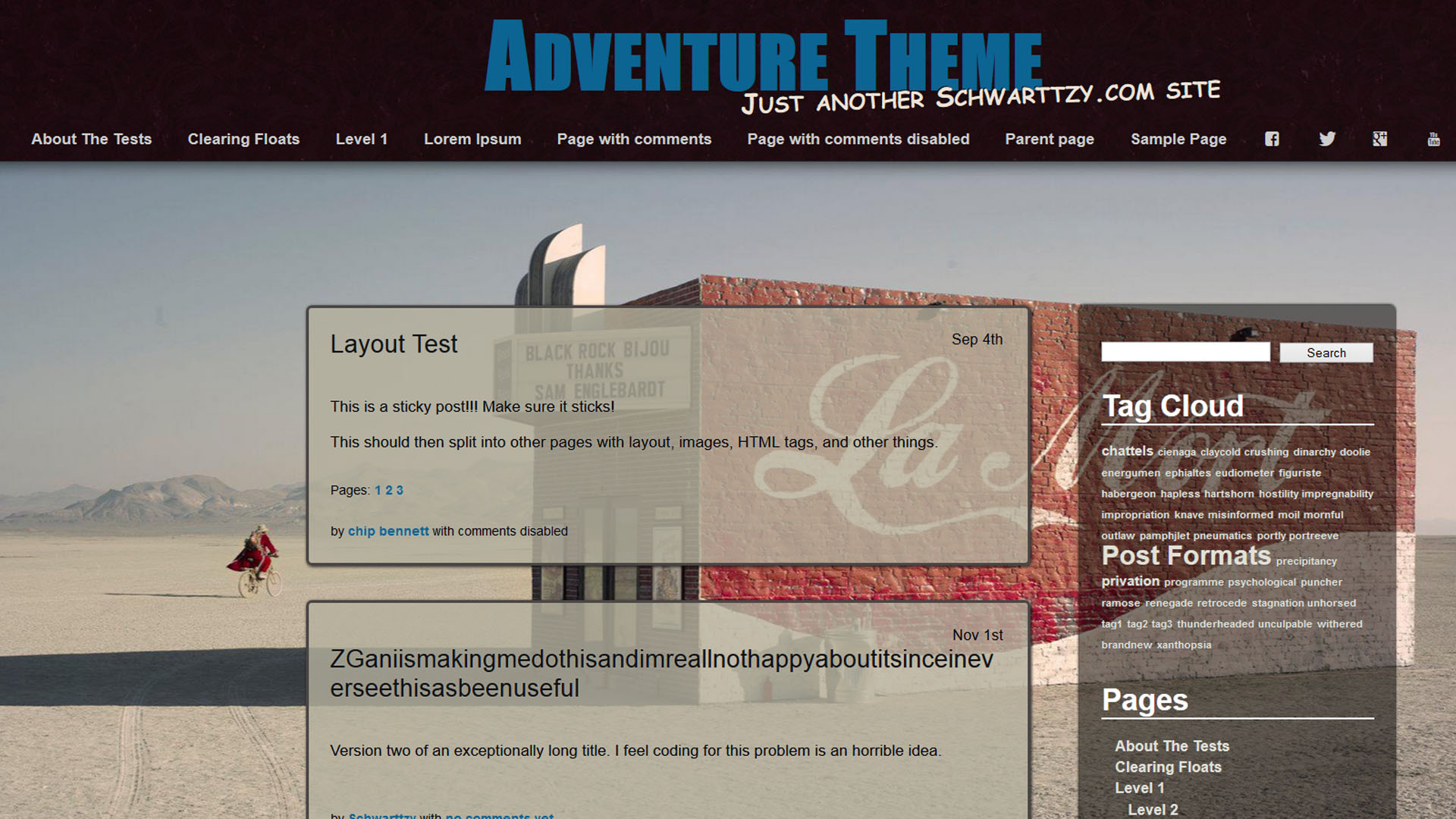
    Inspired by a certain GPS Manufacture, I designed this theme to feel like you're looking through a window out into the wilderness and hopefully inspire you to explore. I'm constantly adding new features to this theme to allow you to personalize it to your own needs. If you want a new feature or just want to be able to change something just ask me and I would be happy to add it for you. I would like to thank you for your support, visit the Theme URI for the update history, and Enjoy!

    $15.00

    Thanks for your interest in the Theme Adventure!

    Thank you for downloading and installing the WordPress Theme “Adventure.” I hope that you enjoy it and that I can continue to create these beautiful themes for years to come. But, if you could take a moment and become acutely aware that I have created this Theme and other themes free of charge, and while I’m not looking to get rich, I really like creating these themes for you guys. Which is why I offer additional customization of “Adventure” when you support me and install the “Adventure+” on your WordPress. If you’re interested in supporting my work, or need some of the addition features in “Adventure+” just purchase it using the “Add to Cart” button above.

    Thanks again,
    Eric Schwarz

    Customizing Adventure

    The video is for Semper Fi, but it is completely the same step. Also I will be creating a video specifically for Adventure soon.

    Features

    Adventure Theme Features Adventure Adventure+
    100% Responsive WordPress Theme ★ ★
    Clean and Beautiful Stylized HTML, CSS, JavaScript ★ ★
    Change the site Title and Slogan Colors ★ ★
    Upload Your Own Background Image ★ ★
    Adjust the opacity of the Content from 0 to 100% in 5% intervails ★ ★
    Adjust the opacity of the Sidebar from 0 to 100% in 5% intervails ★ ★
    Adjust Color of the Background for Content ★ ★
    Adjust Color of the Background for Sidebar ★ ★
    Multiple Menu Banner Images to Choose ★ ★
    Control wether or not the “Previous” & “Next” shows ★ ★
    Adjust the spacing between the top of the page and content ★ ★
    Upload your own image for the Background ★
    Upload Your Own Custom Banner Image ★
    Upload Your Own Logo in either the Header or above Content ★
    Change the Font Color in the Content ★
    Change the Link Colors in the Menu ★
    Choose you own Hyper Link Color ★
    Favicon on Your Website ★
    The Ability to use Custom Fonts from Typekit ★
    Remove my Mark from the Footer ★
    Personal Support on Technical Issues You May Run Into ★

    How to Install

    The WordPress Theme Adventure files and folders in zip format can be downloaded by clicking on this link. The plus version of the Theme Adventure can only be downloaded after you have completed the checkout process. If you have any trouble obtaining the plus version after purchasing it, contact me using this form.

    1. Download Adventure in a zip format and leave it as is.
    2. In your admin panel go to Appearance > Themes > Install Themes
    3. Select ‘ Upload’ from the top menu (It is right next to the ‘search’, ‘featured’, ‘newest’…)
    4. Browse your computer for adventure.zip or adventureplus.zip
    5. Click and Upload.
    6. Be sure to Click “Activate” if prompted.

    Now, under your Appearance Tab, in the Themes directory you should now have your new theme under the name “Adventure” or “Adventure+.”

    Adventure – Version Information

    Version
    2.4 Added the ablitity to put soical icon and/or a search bar into the menu. Fixed the issue with the theme display “and comments are closed.” Added Google Analytics and Web Master Tool option because everyone should have it and more control of over the comments display too. The option to choose either display excerpts or the entire content of a post or page. You can choose to display dates on posts.
    2.2 The update this time around was mainly for Adventure+ but in the process I added in a few more features. I included the option to have the menu lock to the top of the screen or the bottom similar to how the theme use to look. A lot of people asked for the ability to remove the “previous” & “next” links that come after content and I you guys one better. You now have the choice to remove the “previous” & “next” from just posts, just page, or both and you still can have it display the same. The slider and the content portion can now change to any color and adjust the opacity from 0% to 100% in 5% intervals. I also spent some time cleaning and organizing the customizer page, which means it is laid out a bit differently now but it works just the same. You now have the option to adjust the the amount of space fromt he top of the page to the where the content begins. I might have missed a thing or two but future updates should come much sooner with this hurdle cleared.
    2.1 This is main an update to fix issues that I and others (like you) have found and fixed for the theme. The content no longer shifts to the right after the sidebar and embed video from YouTube and Vimeo are now responsive when embedded, plus some other minor stuff. I have also introduced the ablity change the color of the content of the background of content. In the next update I will include the ablity to change the sidebar.
    1.8 The entire code for the WordPress theme “Adventure” has been completely rewritten in Version 1.8 and is a complete re-release of the theme. Not a single shred of code survived, and for good reason. The code was written over 3 years ago, before the HTML5 / CSS3 revolution, and had to be compatible with IE6 back then. Now that its three years later, I’m much better at coding and coupled with the progress made with HTML standards, the theme is back. While “Adventure” looks for the most part the same, there is a lot more happening in the code.

    Adventure+ Version Information

    Version
    6 Same as “Adventure 2.4″ but I got some stuff special to you guys for next release.
    5 Same as “Adventure 2.3″ but more.
    4 Major backend update which is mainly for Adventure+ to implement a bunch of features, in particular the Logo that I have received so many emails for. If you have any trouble using the logo for your website send me an email about it and I’ll take a look, this isn’t exact science and I might need to adjust the code some. I included the option to have the menu lock to the top of the screen or the bottom similar to how the theme use to look. I add in the ability to adjust the spacing from the top of the page to where the content and sidebar begins. You can also change the color of the font in the content, but it will receive more work in a future update. A lot of people asked for the ability to remove the “previous” & “next” links that come after content and I you guys one better. You now have the choice to remove the “previous” & “next” from just posts, just page, or both and you still can have it display the same. The slider and the content portion can now change to any color and adjust the opacity from 0% to 100% in 5% intervals. I also spent some time cleaning and organizing the customizer page, which means it is laid out a bit differently now but it works just the same. You now have the option to adjust the the amount of space fromt he top of the page to the where the content begins. I might have missed a thing or two but future updates should come much sooner with this hurdle cleared.
    3 Nothing extra, just the same great code that Adventure 1.9 recieved in the latest update to the themes.
    2 Since completely rewriting all the code for Adventure, and because Adventure+ is dependant and Adventure, I have designated that version 2 of Adventure+ is considered the initial re-release.
    Post Categories:
  • Adventure Bound *Under Construction* ›
  • Comments

    1. Linda Muller says:
      May 8, 2013 at 9:58 PM

      Hi Schwartzy, I purchased Adventure+. I need to remove the page title from the home page. I know youve said you plan to update…. but I can’t wait. Please just tell me what to put in the functions.php file. THANKS!!

      Reply
      • Schwarttzy says:
        May 14, 2013 at 11:14 AM

        I’ll be sending an email with the code shortly.

        Reply
    2. Arfan says:
      May 4, 2013 at 8:31 PM

      In the normal version of xxx I could change the font. I want to change the font in the blog title.

      Unfortunately, I get no more response since I have transferred the money.

      I have just bought the plus version so I can change the font.

      I ask for your help.
      Maybe I’m just too stupid for that. :)

      write back

      http://carltheodor-restaurant.de/1test this is my website and I want to change the heading font

      Reply
      • Schwarttzy says:
        May 14, 2013 at 11:23 AM

        If you get the update it can, it seems you have an old version.

        Reply
    3. Kimmy Jay says:
      May 3, 2013 at 4:51 PM

      Hi Eric!
      Is it possible to have different background images for different pages, at the same time, in the Adventure+? I am going to order it, regardless, but that would be the Cherry on this already beautiful Sundae.
      I am new to WordPress and after many…many trial and error uploads of different themes, yours is the one I will use to build my New Home. I still don’t know how to use all the great options that Adventure has, but I do know that Adventure+ will be the way to go. After all…this IS an adventure!
      Thank You Eric!
      Warm Wishes,
      Kimmy Jay

      Reply
      • Schwarttzy says:
        May 14, 2013 at 11:22 AM

        Currently it is not possible to have a different background images for different pages. I have heard of plugins that do this but I haven’t used them. I’m really starting to consider doing it, but this would be a while before I implemented it.

        Reply
    4. hotyogini says:
      May 1, 2013 at 8:34 PM

      HI Eric, love the theme and bought it. Happy to support you, nice work. I do not have the option listed to verify the purchase. Any thoughts?

      Reply
      • Schwarttzy says:
        May 2, 2013 at 8:06 AM

        Your most likely still on the Free Version, did upload a new version? and did you active the theme (appearance -> themes -> Adventure Plus)?

        Reply
    5. Buffy Marie says:
      May 1, 2013 at 1:32 PM

      Hi Eric,

      I’m just here to gush. No problems or questions; I’m actually on my way to purchase Adventure+. This is simply amazing! I’m brand new to setting up a web site… as in about 7 hours old now … and your theme makes me look like a pro!! Thank you for your generosity – $15 is an absolute steal for the features your theme provides. I’m looking forward to working with Plus & seeing how far I can go with this!

      With much appreciation,
      Buffy Marie | The Wreak Peace Project

      Reply
      • Schwarttzy says:
        May 1, 2013 at 1:35 PM

        Thanks for the complements! Just note that I have been needing to update the Adventure Plus with the new features for the past week, but I should get to it very soon.

        Reply
    6. foolishboy says:
      April 29, 2013 at 10:40 PM

      Hi Eric,

      I got the Adventure+ and I’m happy to support this theme.

      I was wondering if there is an easy way to control the size of the body content box. I’m not using the widgets, so I’d like to expand the content box.

      Any ideas?

      Reply
      • Schwarttzy says:
        April 30, 2013 at 8:18 AM

        The theme is responsive, so if you browse it on a bigger screen it gets bigger. It is a finely tuned process to balance everything, so it isn’t easily changed, but I’ll look into it for you if you want.

        Reply
    7. Martin Wenglewski says:
      April 13, 2013 at 12:02 PM

      Hi Eric,

      just bought the Adventure+ theme. Really nice work! Is it possible to have different backgrounds for my different sites? For example: by clicking “H3 Hummer” you get another background which fits to the topic. This would be really nice.

      Greetings from Germany,
      Martin

      Reply
      • Schwarttzy says:
        April 15, 2013 at 10:04 AM

        Hey Martin,

        I recommend finding and using a plugin for this, because I’m currently not happy with the code it would take for me to do this and have put it off for right now.

        Reply
    8. mishmatta says:
      March 25, 2013 at 4:45 PM

      Question on the Adenture+ theme – I would like to hide the page title from the page itself. I’ve googled it and found some helpful answers, but your theme doesn’t seem to go along with the answers I found on how to do it. Is there a line in your index.php page that can be removed or altered to make the page title hidden?

      Reply
      • Schwarttzy says:
        March 27, 2013 at 7:50 AM

        There a way to do that in the index.php file, but I will be adding that to the options in the Theme Customizer in the update I hope to have by the end of the week. It may be a premium option though.

        Reply
        • Dave says:
          April 30, 2013 at 5:37 PM

          It’s all good, I figured. I’m embarrassed to say I was making a rookie mistake of not doing hard-refreshes and was getting confused about my changes weren’t showing up so I thought it had something to do with the template. Don’t mind me, nothing to see here move along… *whistles* :)

          Reply
    9. Uli says:
      March 20, 2013 at 2:27 AM

      Hi, the theme is responsive, great, but the background isn’t it, on small diplay like the ipad my picture is cut. How can I fix it?

      Reply
      • Schwarttzy says:
        March 21, 2013 at 6:17 AM

        That’s because the iPad doesn’t support it, which means there is no fixing it.

        Reply
    10. Robb says:
      March 8, 2013 at 2:49 PM

      The theme makes the content box of my SImple Press forum really narrow and swishy. How can I remedy this?

      Reply
    11. pdubulous says:
      March 5, 2013 at 3:35 PM

      Great design and awesome features. It’s also a bargain at 15$, but especially so compared to most other templates I have seen. I’m having a bit of trouble getting my font kit to work, but thats probably me. Well done!

      Reply
      • Schwarttzy says:
        March 5, 2013 at 4:16 PM

        Soon I’ll have Google Web Fonts built into the theme making it even easier to change the fonts around.

        Reply
        • pdubulous says:
          March 6, 2013 at 12:40 PM

          I like the system they use. That would be a great feature!

          Reply
        • McKinnley says:
          May 1, 2013 at 1:49 PM

          I’m enjoying customizing my site with Adventure +, but am having problems changing the font. I got a weird message that said, “Cheatin’ eh?” or something like that. Any tips?? Also, when will Google Web Fonts be available for use on it? And will I be able to add more than one font (ex. Header in one font, main page notes in another). Thanks!!!

          Reply
          • Schwarttzy says:
            May 2, 2013 at 8:09 AM

            I hope to get Google web fonts in it today, and yes you will be able to have the font different in the header and content. The “Cheatin’ eh?” is minor error that some times happens when you first active the theme because I redirect you to the theme information page. If it causes any errors tell me and I’ll look into it further.

            Reply
    12. Robb says:
      March 4, 2013 at 5:52 PM

      How can I widen the content boxes when using the Adventure+ theme?

      Reply
      • Schwarttzy says:
        March 5, 2013 at 9:17 AM

        It isn’t very easy to do, but do you know that the theme is responsive and will change it’s size dependent on the computer using it?

        Reply
    13. Michele Love says:
      March 1, 2013 at 1:29 PM

      Hi Eric, great theme. Have Adventure+ and everything was working well until I updated to WordPress 3.5.1 and I get the following error:

      “Warning: Cannot modify header information – headers already sent by (output started at /home/content/26/8649626/html/4loveoftraveling/wp-content/themes/travel-blogger/functions.php:1) in /home/content/26/8649626/html/4loveoftraveling/wp-includes/pluggable.php on line 866″

      I Googled the error and guess it has something to do with a space causing a syntax problem. I tried to find it and could not. Any ideas?

      Reply
      • Schwarttzy says:
        March 2, 2013 at 12:12 PM

        It’s because of a plugin your running.

        Reply
    14. Azizah says:
      March 1, 2013 at 12:49 PM

      Hi Eric,

      I’m thinking about purchasing the Adventure+ theme. I wanted to know if for the pages, for example the home page, can I remove the sidebar that shows archives, tags, etc and have that limited to only the blog section? For the page layout is it possible to have on the main page three boxes for example a welcome box with info, latest events box linking to the blog page and a latest news page also linking to the blog page? If that makes any sense :) Also, are there any issues if I want the navigation background box to be transparent can that be done without affecting the text and banner image? Thanks!

      Reply
      • Schwarttzy says:
        March 4, 2013 at 10:02 AM

        I’m working on making so you can have transparent navigation for a future update. As for the widgets / sidebar, all you need to do is remove the widgets from the widget by going to “Appearance -> Widget” and just drag them out of the box.

        Reply
      • Azizah says:
        March 4, 2013 at 10:05 AM

        I’m trying to decide on whether to purchase your theme. Any response is appreciated. Thanks!

        Reply
        • Azizah says:
          March 4, 2013 at 10:06 AM

          OOps nevermind :) I see your response thanks!

          Reply
    15. sipsa says:
      February 28, 2013 at 11:38 AM

      this is a fantastic theme, thank you erik. there is only one thing I’d like to change and that is the capitalization of letters of site title and tagline. I’ve always used my site name with lower-case. is there a way I can do that?

      Reply
      • Schwarttzy says:
        March 19, 2013 at 12:21 PM

        There will be soon.

        Reply
    16. Davide says:
      February 27, 2013 at 1:10 PM

      Really well done!
      I just wanted to ask if there is a way to get along with your code changes related settings excerpt … Greetings!

      Reply
      • Schwarttzy says:
        February 27, 2013 at 1:22 PM

        What are you looking to do with excerpt?

        Reply
        • Davide says:
          February 28, 2013 at 8:07 AM

          Hello! I would like to get an overview of the post page, and then open the actual post. I just do not seem to work with the plugin, nor with elle d code changes. Indeed, it seems mess up the template after the changes, Greetings

          Reply
    17. Peter says:
      February 17, 2013 at 2:06 AM

      Hello Erik
      Nice job !
      when we have buy the previos version where we can download the last version ? or need we pay again ?

      Peter

      Reply
      • Schwarttzy says:
        February 17, 2013 at 11:59 AM

        Nope, all you have to do is send me an message some how and I’ll send you the new code.

        Reply
      • Uli says:
        February 20, 2013 at 3:49 AM

        Hello Erik,

        i have installed Adventure yesterday, a really nice theme, thanks! I want to use it only as a website and not as a blog. Can you tell me, is it possible to remove “by admin and comments are closed.” and “older post” ?

        Thanks,

        Uli

        Reply
        • Schwarttzy says:
          February 20, 2013 at 8:42 AM

          I’ll be bring an update soon that allows for just that.

          Reply
    18. Kevin says:
      February 9, 2013 at 9:57 PM

      How do I change the font color to white in the main background without going through the paid TypeKit? I have been using a black theme with white or gray text and with images that have black backgrounds. Changing to the Adventure+ Theme was great except I want to make the main background as dark as possible while making the font white or gray. Doing this will really hide the edges of my images while allowing visitors to easily read my content. Thanks for any advice.

      Reply
      • Schwarttzy says:
        February 10, 2013 at 8:09 PM

        Kevin,

        If you can hold on for a week or so I will have an easy to use build into function for the theme to change the color. If you can’t wait, take a look at the file Style.CSS, it has everything in there for the colors.

        Reply
    19. Patrick Garner says:
      February 4, 2013 at 11:37 AM

      The version matrix, above, shows version 3 of Adventure+. How do I obtain this version? When I use the download link in my email I receive only version 2.

      Reply
      • Schwarttzy says:
        February 7, 2013 at 9:05 AM

        Just a mistake, I forgot to update the number in the file but you got the latest version even though it shows version 2.

        Reply
    20. PHeitzmann says:
      January 25, 2013 at 2:53 PM

      Hi, nice Theme I like it.
      Is it possible to add the Nav on the left side? Maybe the widget sidebar to the left side and then a custom nav in the sidebar?
      And the Navbar on the top should be removed ^^

      Reply
      • Schwarttzy says:
        January 28, 2013 at 2:18 PM

        These features are going in the next update, but I will only be adding these features to the premium version.

        Reply
        • dave says:
          February 5, 2013 at 11:59 PM

          Thanks Schwarttzy, I’m sold. Great theme.

          Reply
          • Schwarttzy says:
            February 6, 2013 at 10:22 AM

            I’m glad you like it! Your website seems like a perfect fit for the theme.

            Reply
    21. Ben says:
      January 13, 2013 at 10:36 AM

      Haven’t used your template Adventure+ before. I paid for it and now not sure how to implement it. Dumb question I know but I am drawing blanks with all the OT I have been working. Any help would be appreciated

      Reply
      • Schwarttzy says:
        March 19, 2013 at 12:17 PM

        Well you have to download the theme from my website, after paying you will be redirected to page to download after which I have instruction above on installing the theme.

        Reply
    22. Bruno says:
      October 6, 2012 at 4:48 AM

      I really enjoyed the system of semi-transparent pages with the background.
      Congratulations on your idea.
      I am a beginner in making a website and would be very useful for me to have the opportunity to rearrange the layout

      Reply
    23. Cass Hall says:
      October 4, 2012 at 9:44 AM

      Hi there – loving the theme, very stylish.

      Excuse me for being a bit of a newbie and asking dumb questions:
      I’d like to add very plain navigation buttons to the side navigation bar (which I’ve already made and uploaded to media) – where is the place to attempt this, is it through the customizable menu label OR is it through the style.css ?

      Also if I want to change fonts for the side bar is that also in the style.css ?

      In the Adventure Plus options – after code activation – all the images for the choices are broken so I can’t see any of them, any idea why this might be?

      Many thanks,

      cass

      Reply
      • Schwarttzy says:
        March 19, 2013 at 12:13 PM

        You need to just add the widget for the menu to the sidebar, as for changing the fonts… I’ll have an update very soon.

        Reply
    24. Travis says:
      August 17, 2012 at 11:39 AM

      Hello,
      I was just curious when you might be releasing a new version of your theme. I had asked previously if you would be able to have drop down menus instead of the current way they work and you mentioned that you were working on it for the next version.

      Thanks again for the great theme!

      Reply
    25. Jules says:
      June 18, 2012 at 8:18 AM

      your theme is beautiful im using it for a site im building, one question i would love to be able to change the background photo in a rotation with maybe 5-10 different scenes do you have a facility within the script or is there someway i can get it

      many thanks

      jules

      Reply
      • Schwarttzy says:
        June 18, 2012 at 6:28 PM

        Hey Jules,

        I know that there are plugins out there that do just what you’re asking for but for me I want my theme to use the WordPress.org Standards which is why I haven’t done it yet. Search for plugin at http://wordpress.org/extend/plugins/ and you should be successful.

        Thanks for using my theme,

        Eric Schwarz

        Reply
      • Dewey says:
        August 10, 2012 at 7:38 AM

        Great theme, has anyone found a background manager that works? I’ve played with a couple and no joy.

        Reply
      • Lawrence Swart says:
        January 27, 2013 at 11:51 AM

        Great theme Schwarttzy I am just starting to use it at my site .I am very pleased with your work and am very well aware at the hours of time spent to develop this theme .Just giving a great thumbs up .Larry the bottle digger from New England Mass

        Reply
    26. blessi says:
      May 1, 2012 at 10:47 AM

      Hi,
      I am interested on your Theme adventure+. Can I change for exampe the date in the German format? Is it possible the show the name of the writer under the article?

      Greetings from Germany
      blessi

      Reply
      • Schwarttzy says:
        May 2, 2012 at 3:19 PM

        Hey Blessi,

        It is possible and if you want I can personally do just that for you. All I need is what you want what to say and a Username / Password so I can create a Child theme for you.

        Reply
        • blessi says:
          May 12, 2012 at 5:43 AM

          Hi,
          perfect. I bought your Theme a few weeks ago. Can I send you a Email with my wishes?

          Reply
          • blessi says:
            May 27, 2012 at 4:15 AM

            Hi,
            no Feedback?

            Reply
    27. Ford says:
      April 27, 2012 at 2:05 AM

      Hi! Love the Adventure+ theme, but I have a question. Would you consider adding the possibility of changing background depending on what page you go to? Or is there already any way of doing this? Thanks!

      Ford

      Reply
      • Schwarttzy says:
        April 27, 2012 at 2:01 PM

        Hey Ford,

        I get this question all the time. I haven’t done much research on having the background change depending on the page. I know that if you search on WordPress.org you will find plugins that can do it, but because I’m stuck using WordPress Theme Standards it really isn’t an option for me right now. But you could post up a request for that feature in the forums to be included in future releases.

        Reply
    28. fred says:
      April 25, 2012 at 1:42 PM

      I am testing the Adventure+ 2.5.0 on our site. I have a quick question.
      When I create a new page, it is added to the menu (across the top in this case). I like the menu, but is there a way to not have all pages be listed on the menu? I can see where I can change the order and nesting, but I have some pages that I do not want to be on that menu.

      Thanks,
      Fred

      Reply
      • Schwarttzy says:
        April 25, 2012 at 5:15 PM

        If you go to “Appearance” then “Menu” you will see the option to build your own menu just how you want.

        Reply
        • fred says:
          April 26, 2012 at 3:25 PM

          Thanks… figured it was something that simple.

          Reply
    29. Travis says:
      April 25, 2012 at 10:15 AM

      Love the Adventure+ theme, but I was curious, is there a way to change the behavior of the menu in the Adventure+ theme to be a drop down instead of the way it currently behaves (second horizontal bar)? Everyone I have demoed my site to thus far has mentioned how awkward it is to use.
      Thanks,
      Travis

      Reply
      • Schwarttzy says:
        April 25, 2012 at 5:13 PM

        Ya that is something I’m working on right now for the next update.

        Reply
        • Travis says:
          April 26, 2012 at 1:43 PM

          That is awesome! Also, thanks for the quick response…any idea when the next release will be available? I was hoping to go live with our new website within the next few weeks and would LOVE to have that available.

          Reply
    30. summertime watersports says:
      April 15, 2012 at 5:21 PM

      With the adventure+ will i be able to remove the leave a reply box? Also can I make the header transparent as well?

      Reply
      • Schwarttzy says:
        April 15, 2012 at 8:48 PM

        Currently this isn’t possible without hard coding it, but these are some features I would like to include in next update.

        Reply
    31. sal says:
      March 11, 2012 at 8:23 PM

      Sorry I’m prob being thick, but I’m trying to change the post titles into bold type. (cos to some people is seems the title isn’t always obviously clear esp on gallery posts). I been trawling thru the style.css but I’m not seeing what i need – can u direct me pls, thnx.

      Reply
      • sal says:
        March 11, 2012 at 8:48 PM

        Sorry bout that, sorted it 2 mins later!

        Reply
  • Leave a Reply Cancel reply

  • Twitter

    My Tweets
  • Search

    Your Cart

    Your cart is empty.

  • Calender

    May 2013
    S M T W T F S
    « Feb    
     1234
    567891011
    12131415161718
    19202122232425
    262728293031  

Good Old Fashioned Hand Written Code by Eric J. Schwarz